Experience Design Intern · Monetization Design · Beijing · Jul – Sep 2026
RedNote 小红书 — Creative Lab
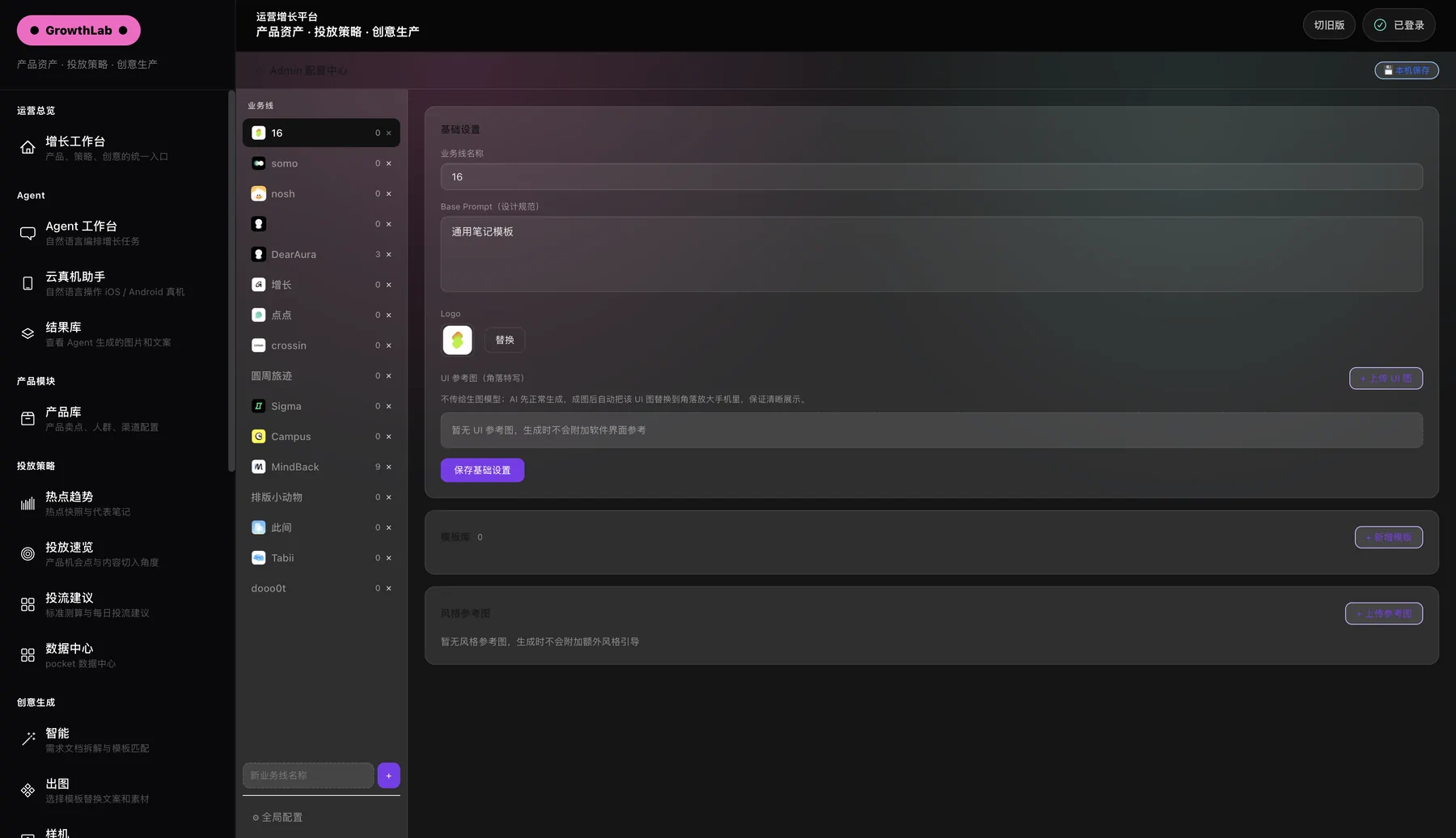
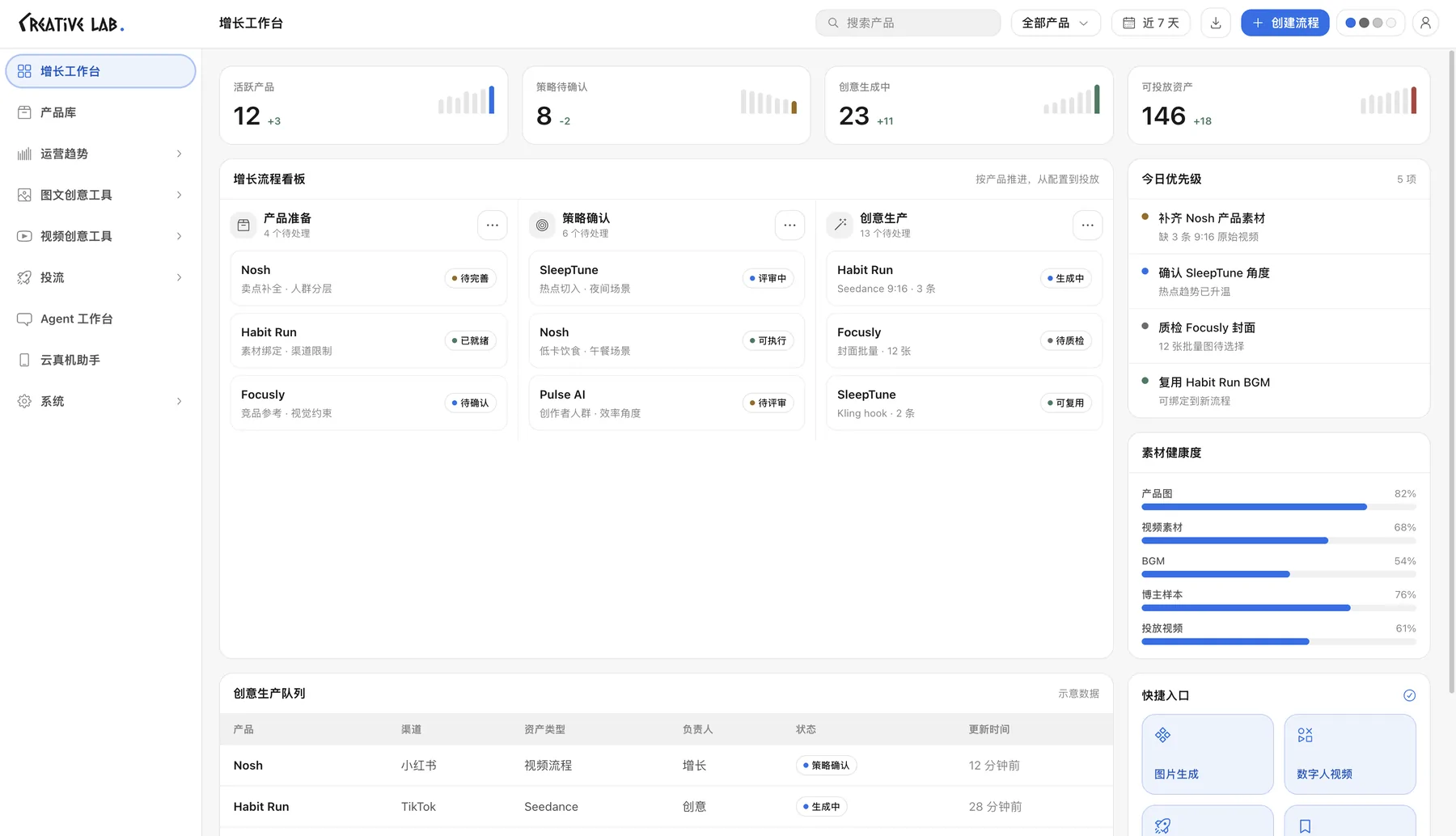
I was tasked to redesign a beta version of Creative Lab — RedNote's content-generation intelligence tool, on a platform of 300M+ monthly users — that had very unfriendly navigation. I owned the end-to-end UI/UX and the front end. Alongside it: monetization design, how AI creative tools turn free creators into paying users.
 ⇆
⇆The problemA sidebar you had to scroll: 24+ entries, each with its own line of description, and 14 creation tools in one long run.
- Grouped the tools by the job they do — trends, image + copy, video, ads — into nine sidebar entries across two clear levels.
- Collapsed the groups by default, so the whole sidebar fits on one screen without scrolling.
- Made the workbench the home: the pipeline as a board — product prep → strategy → creative production — with today's priorities and asset health beside it.
The problemThree separate sidebar tools for one job, and a chip cloud of business lines eating the top of the form.
- Combined the three tools into one page, with inner tabs in the header.
- Added a 1-2-3 stepper — input, confirm, results — so the flow has an order, plus an empty state that says what happens next.
- Turned the chip cloud into one dropdown and grouped every generation setting into a single card.
The problemEvery video model had its own page — Kling, Seedance, three-view, style transfer, batch — reached from an icon rail with no labels.
- Merged seven video tools into one workbench, with an inner nav staged the way the work goes: 1 prepare → 2 generate one → 3 batch.
- Laid the create form out in the order you fill it — first / last frame, then reference images and video — with upload, asset-library and generate on every slot.
- Moved create / track into the header as tabs, so each view stays short.
The problemTemplates, angles, uploads, icons, widgets and results all competed on one three-column screen — nothing said where to start.
- Turned it into a 1-2-3 flow, shown as a stepper: pick a template and angle → add your asset → generate and swap backgrounds.
- Stacked the inputs in the order you use them, in one column, with the result beside them.
- Wrote an empty state that explains the loop: change the angle or background, regenerate, and every version is kept.
The problemSetup, report and history fought for one screen in three columns, and the findings sat in cards inside cards inside cards.
- Gave the findings the full width: one ranked board — surge index, discussion and view counts, a 30-day sparkline per topic.
- Showed each topic's representative notes as cover cards you can scan, instead of rows of text.
- Moved the run controls — date, snapshot, status — into the header, and made every topic collapsible.
The problemThe platform switch hid in a corner, and the page had no structure until a report existed.
- Moved the platform switch (RedNote / Douyin) out of a corner toggle into tabs in the header.
- Cut the big title row, so the numbers start at the top of the page.
- Rebuilt the report as a ranked board — heat bars, an AI-assigned category, and rows that expand for detail.
The problemEvery action — refresh, new, save, use-for-scan — was parked in the top-right corner, far from the list and the form they act on.
- Moved the list's actions onto the list, and save into a sticky bar where the form ends — with a reminder to save.
- Turned the form's sections into collapsible cards, each with a one-line note on what it's for.
- Set the destructive action (delete) apart from the everyday ones.
The problemPersonas lived as numbered rows inside the copy workshop — an ID, a status, a date, raw JSON underneath. You couldn't tell who a character was without opening it. (Real creators' details are blurred.)
- Gave characters a library of their own, with a tab per asset type: AI characters, finished videos, general assets, music, product assets.
- Made every character a card you recognize at a glance — portrait, voice, number of portraits — with search and a single “new” action.
- Replaced IDs and raw JSON with names, faces and voices.
The problemThe old tool's dark look was a separate build with its own layout — a toggle switched between two different tools, not two themes.
- Put every page on shared design tokens, so a theme is a token swap, not a second interface.
- Four themes ship from a switcher in the header — dark included — and every page follows.
Process
- 01
Audit
One tool in two skins with a toggle between them: unlabeled icon rails in one, a flat list of 14+ tools in the other.
- 02
Restructure
Tools sorted by the job into two clear levels; sibling tools merged into one page with inner tabs.
- 03
Systemize
Every page moved onto shared design-system tokens and components: one stepper, one segmented control, one empty state.
- 04
Iterate
V1 “Growth Lab” → V2 “Creative Lab”: three nav levels became two, platform tabs moved into the header, title rows cut so the data starts at the top.
- 05
Ship
Built the whole front end myself, fixed security and back-end bugs, tested at an internal RedNote hackathon.